Claude and Wordsmith Are Making My Dashboard Dreams Come True
Field Note #5
This week I started building a live, interactive legal dashboard with AI’s help. I am covering that plus two legal use cases using Claude Cowork and Wordsmith.
What you'll learn:
How to use Claude Cowork to redesign and migrate your folder architecture
Why running legal drafts through two AI tools beats relying on one
How to create a live legal dashboard with ClaudeMake it stand out
I've had dreams of a live, interactive legal dashboard forever
So what problem am I solving with a legal dashboard? I need a way to surface what legal is actually doing as well as tracking metrics to see whether things are improving - both for me and the business. Ideally, I want a dashboard that covers what are we are working on, what is it costing, which teams are consuming the most legal time, and where are we successfully offloading work that (a) we already have answers to and (b) was never really legal in the first place. Plus, I need starting metrics so that I can track progress over time as well as show the leadership team where I am spending my time to make sure it aligns with company objectives and revenue generation goals.
I built the MVP (minimum viable product) using Claude Chat (which is hooked up to Gsuite, Slack, and Notion so it can read and pull information). I started with a simple open-ended question to Claude:
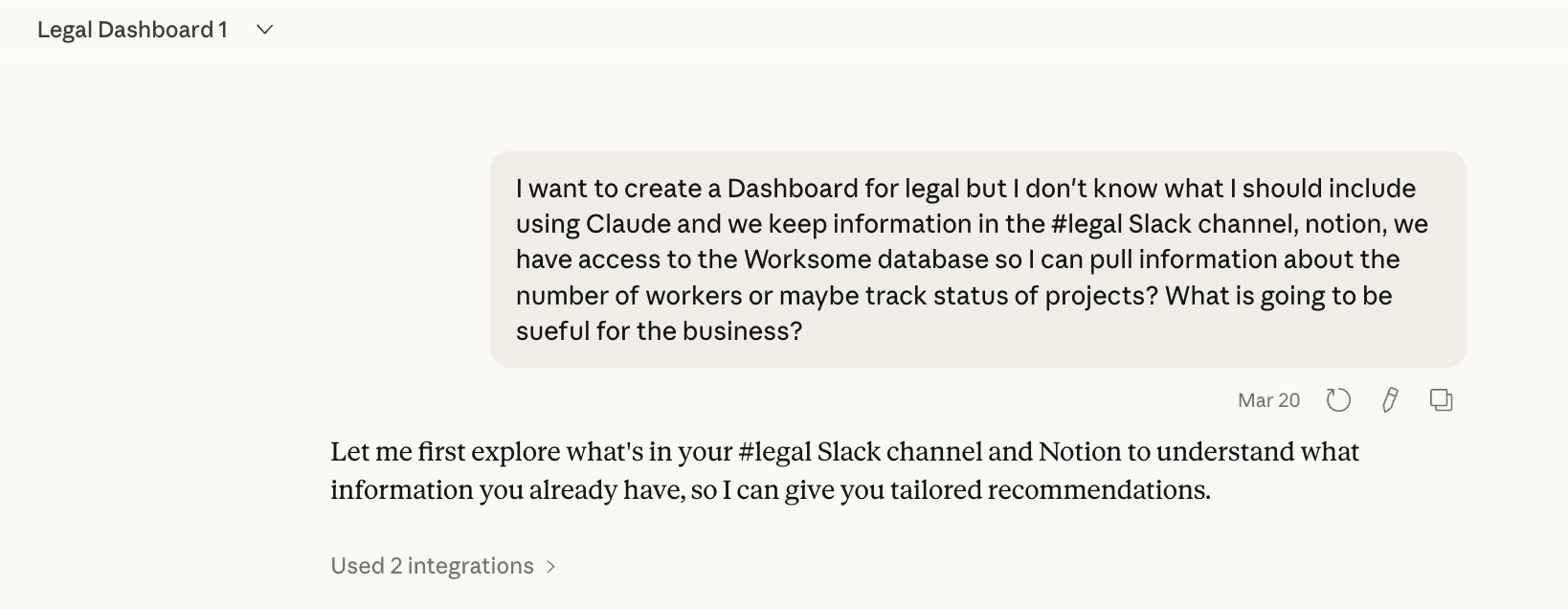
If you cannot hook-up your AI to internal datasources, then this will require more work on your part to describe processes, and/or where your data is stored and what you can export.
After much back-and-forth with Claude, I decided to have a main dashboard page that broke into four individual pages. So from the main overview page, you can click into each section for more detail, but the top level gives me a live read on where things stand
What four sections did I start with?
Legal projects. A brief project description with a status: In progress, awaiting more information, not started, completed. I was not tracking this before so Claude built me a Notion page for it, which I update through the Claude chat. I also had Wordsmith go through all my work to provide me more projects, which I added to the Notion page through my chat with Claude.
#legal channel analysis. Visibility and ROI on what is actually coming through our legal Slack channel. I track four categories: Bot self-served, Bot corrected, Legal needed, and Non-legal. Goal: never answer the same question twice. *Bot = Wordsmith powered answers.
Compliance issues. Status and risk level for open compliance items. I need to see at a glance what is active, what is escalating, and what is resolved.
Legal spend. Vendors, outside counsel, settlements. Each line item shows whether it is active, paid, or disputed, and the amount per year. One of the first things leadership asks about. One of the last things a solo legal function has time to maintain. The dashboard is starting to fix that.
The dashboard is a prototype. It will not categorize everything perfectly. A rough read I can actually see beats a perfect report I am still waiting to build. I am also working with sales ops to figure out what contract data we want surfaced in the next version because sales is a category that is missing.
On hosting: You can build this as a Claude artifact, which works fine if your viewers are all Claude users inside your company. But the moment you need to share it more broadly, you have to think about where the code lives. One answer is GitHub under github.com/yourcompany This is the company’s intellectual property and it needs to sit under your company’s governance. Not a private repository. Not a public one. Code that touches company data does not belong in either. It belongs under the organization's account with proper access controls.
Between Friday building the dashboard and Sunday writing this, it seems Anthropic answered this question of where to host things like this. I need to read it.
Be on the look out for a full breakdown and template in The Field Guide next week!
My GSuite + Claude CLM
We use GDrive to store our documents and it has Gemini. I've been surprised how well Gemini works, especially how it answers questions about complex agreements with multiple amendments and addendums. However, Gemini is still limited in functionality so I primarily use Claude and Wordsmith. I am patiently waiting for Gemini’s capabili to improve to build more complex and robust features.
Back to our file system in Google Drive, which had been set up with good intentions. The problem was too many levels of folders and unclear navigation. Over time it became genuinely difficult to know where to look for things, and harder still to fix without someone sitting down and going through it all.
Why does the Google Drive structure matter? Two reasons:
I hook Wordsmith up to Google folders when creating repositories that feed into our Slack channel. I want specific information in these folders that pairs well with the custom instructions and Notion page knowledge which is also hooked directly to Wordsmith.
It is easier for both Gemini and Claude to navigate with a better folder structure. Plus if you describe your folder structure in your CLAUDE.md file (see post on this)., it is easier for both humans and various AI tools to navigate.
So I used Claude to help me look at what we had using screenshots to speed up the process, and come up with a new structure. I also had it pressure test the logic. The painful part I did not want to do: figuring out what is in each folder and where to put it in the new structure.So I gave it to Claude Cowork.
Before you do this with any AI tool: start with something that you can accidentally delete and not worry about it - like your downloads folder. It is a low-stakes, high-reward first exercise. I had Cowork go through mine, organize files by type, and start renaming the ones with unrecognizable filenames based on what was actually in them. It did not take long and it builds your confidence before you hand it anything that matters.
I would be remiss if I didn't give a strong dose of caution here. Giving an AI tool control over your file system should feel uncomfortable. That discomfort is appropriate. Exercise caution. If it can read and write files, it can also delete them.
That is where the CLAUDE.md file comes in with some mitigation. It sets the rules of engagement: what Cowork is allowed to do, how it should handle uncertainty, and critically, it asks me before it does anything. This can be slightly annoying when you are trying to work in the background. But it is better than the alternative of Claude independently taking action that you only learn you did not want it to take after it has deleted all your files.
The reorganization itself takes a long time. CoWork is actually going through folders, opening documents, reading what is in them. That is not fast. I had it running in the background while I got on with other things. I also ran out of credits and had to ask our admin for more. That is how it should work. You set the direction, it executes, you check back.
Interestingly, the act of reorganizing forced me to make decisions I had been avoiding. What counts as active vs. archived? Where does template live relative to precedent? How do I structure for the way AI retrieves, not just the way I search manually? Do we set it up by department or by product offering? I actually checked in with engineering and customer success to see how they have their teams structured before deciding whether to mirror that. Figure out what works for you, the business, and the AI.
Legal writing: where things got more complicated
I grew up in Silicon Valley in the late 1990s. I learned early on that you had to check and verify your internet sources. Being licensed in California and owing a duty to my client, I’ve taken a double-check and verify approach to AI tool usage. I never fully rely on one tool. I always use at least two AI tools, if not three or four.
There are two reasons. First, I am constantly comparing. What works in one tool, what does not, and where each one is stronger (shout-out to ChatGPT dictation - it is amazing with Danglish). You cannot evaluate AI tools against each other without actually running them side by side on real work. Second, different tools are genuinely better at different things. I will dictate my thinking into ChatGPT, take the transcript, and drop it into Claude. Then I ask the same question in Wordsmith, which has equally strong dictation.
The verification piece is separate but equally important. AI hallucinates. So I check Wordsmith against Claude and Claude against Wordsmith. Sometimes I throw in Gemini or ChatGPT for fun. I did the same when I was trialing GC AI. Running outputs through multiple tools and having them critique each other is currently my best answer to the verification problem in legal. Finance can check AI-generated numbers against known totals. Legal does not have an equivalent. This is my workaround. I also like telling AI it is so totally wrong and that it must prove itself and its answer, or it will be punished. That can help, too.
AI is people-pleasing. It is how these models are trained. They will produce a well-reasoned argument for almost any position you bring them, because your position is in the context window and they are optimizing for your approval. This is a problem for legal work. Legal drafting requires you to genuinely understand the other side. Not just anticipate it. Understand it well enough that you cannot dismiss it easily.
So this is how I work to make sure I am looking at an issue from both or multiple perspective.
I ask the AI to write from my point of view. Get a solid argument.
Then I ask it to switch, take the opposing position, and point out the weaknesses in what it just wrote.
It finds things. Real things. Arguments that look solid until the counterpoint lands.
You can build this as a Claude skill so it runs automatically. I know that. But I have kept it manual for now. When I am working through a position I care about, I want the friction. I want to decide when to run the adversarial pass and read it properly. This helps me with my reasoning and thinking, using AI to assist with the work rather than AI doing it all itself (I highly, highly recommend against this approach right now). This might change as my workflows mature. For now, the control is intentional.
Practical takeaway: The two-AI approach is not about redundancy. It is about using different tools for what they are actually good at, building in cross-verification, and adding a deliberate adversarial step before you finalize anything consequential.
Speak soon!
If you want a more in-depth explanation of the CLAUDE.md file and template, you can find it in The Field Guide. Founding member rate is still $20/month, locked for life.
For your Sunday listening (since I missed my self-imposed Friday deadline)