Claude for Word: The Plugin

Field Note # 8
What you'll learn:
Why .docx is one of the hardest file formats to manipulate programmatically
Why my formatting prompt was bad before Claude even touched the document
Why Claude in chat can't actually "format" your Word doc the way you think it can
Word is a necessary evil
So if you’ve been reading along on LinkedIn for awhile, you will know I have strong opinions about Word plugins. I don’t want to work in Word ergo I am not a fan of plugins. I want to work from the AI desktop app (Claude, Wordsmith and now Gemini!).
So, after hearing the announcement of the Claude for Word plugin I assumed that what they learned building the plugin would also be in the chat. You know what they say when you assume things? Really, I tried to wish my dreams into existence. So, casually, without a solid plan, I decided to test Claude chat with a horrible Word document. I took a PDF that was a mess to begin with (it had different font sizes, one part was a two-column terms and conditions) converted it to a .docx and for extra fun I threw an AI-drafted DPA on it.
While working, I would bounce back and forth and see how Word was handling the reformatting. It failed horribly and I ran out of credits. Now, this failure is part user error and part not using the right tool for the job. Because I wanted to understand why my AI formatting dreams can’t come true, I needed to better understand Word. Having worked at Wordsmith AI, I recall conversations with the engineers about how hard it is to work with Word.
User error - poor prompting
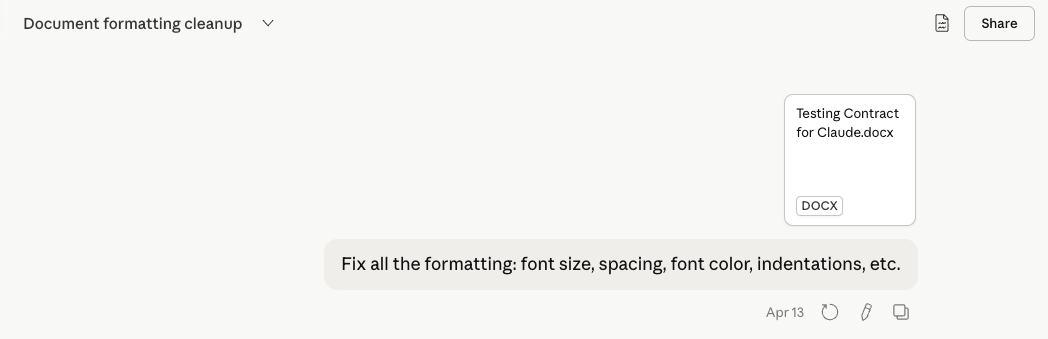
So I started off my test incorrectly with some basic AI mistakes. The first rule I teach is that you need to make the request specific and provide enough context. I did neither of those things here. Here’s all the things wrong with my prompt:
“Fix” is subjective and not a standard. Fix to what? There's no target state, style guide, or reference provided. With no examples to follow, the AI is left to make things up.
"All the formatting" is vague. Does "all" mean everything, or everything that's broken?
My list is arbitrary. Font size, spacing, color, indentation — why these four? What about line height, margins, alignment, weight, hierarchy? Listing some things implies the unlisted things are out of scope, but that's probably not the intent.
No priority or hierarchy. Is H1 size more important than body spacing? No way to know.
"Etc." is doing a lot of work. It signals the prompter doesn't actually know what they want fixed — which means the AI has to guess.
No success criteria. How do you know when it's done? What does "fixed" look like?
Basically: it's a task with no inputs, no outputs, no standards, and no definition of done. The AI will fill every gap with assumptions and probably get it wrong, which it did. But the interesting part is that when it fixed some things, other things broke. So even in trying to clean up the mess I made through prompting, there was still a Microsoft Word issue.
What is a Microsoft Word doc?
I am a Silicon Valley baby. We had Scantron tests on the history of tech companies. I had to memorize all the Steves.
So, a little history about Word. Word first launched on October 25, 1983 and was originally called Multi-Tool Word, built for UNIX. It didn't become dominant until Word for Windows launched in 1989 — by 1993 it held 50% of the word processing market, and by 1997 it was at 90%. (Computer History Museum).
So the core of Word is over 40 years old. The product still has old code in it. This is actually well-documented in engineering circles. Microsoft's own documentation confirms that Word's compatibility mode exists specifically to preserve how documents looked and behaved in older versions some going back to Word 2003. (Microsoft support). That's horrific. Why would I want to use the same technology that I was using 23 years ago?!? I am old enough to have been forced to learn WordPerfect as a legal assistant…
What the hell is a Word document and why does the formatting vex lawyers so?
A .docx file is not a document. It's a zip archive. Inside that zip is a folder of XML files that together represent the document's content, styles, relationships, numbering definitions, and theme data.
The spec that governs all of this — OOXML, the Open XML standard — is approximately 6,000 pages long! On brand for lawyers.
Six thousand pages. For a document format.
It’s been engineers building workarounds for decades and that compounds in whatever it is we have in Word today. So, we are dealing with a living record of every workaround Microsoft made since the early 90s. That is why it is painful.
Here is part of what my unzipped Word file looks like in XML:
![Terminal view of Word's XML: text that looks like "[Customer] [Customer]" is stored as six separate XML runs](https://images.squarespace-cdn.com/content/v1/6391c027ebd8c55ae9469b0e/9b8d19e2-2913-48e0-8d1c-2aa6d1b3b2bc/word-xml-runs.png)
The placeholder for “[Customer]” in a Word document is 6 separate XML fragments.
What the Word plugin actually changes
Claude for Word (launched in beta on April 10) doesn't go around Word. It talks to Word.
It uses the Office Add-in JavaScript API, which means it's going through the same object model Word itself uses. It reads computed styles — not raw XML. It writes tracked changes as real tracked changes, visible in the review pane, acceptable or rejectable like any human redline.
The difference isn't intelligence. Claude in chat and Claude in Word are the same model.
The difference is what they have access to. Chat is working from a text extraction of your document. The plugin is working from the document as Word understands it.
One is a consultant reading a PDF of your file. The other is a colleague sitting inside the application with edit access.
So as much as I hate to admit it, you will need to use the Word plugin to solve formatting nightmares. My AI formatting dreams have not come true yet…
So why can't we just leave Word?
Every few years someone makes this argument. Google Docs. Notion. Coda. GitHub. And nothing changes.
Tracked changes with identity. Redlining as a workflow, not a feature. Styles that define a document's legal meaning (clause numbering, exhibit references, defined terms). Paragraph numbering that cascades correctly across a 200-page agreement. Table formatting that holds in court filings.
None of the alternatives do this reliably. Google Docs track changes are a toy compared to Word's revision model. Notion has no concept of styles in the Word sense. And client-side document exchange still defaults to .docx — so even if you draft elsewhere, you're converting back anyway.
Word is where legal documents live because it was built to handle what legal documents actually require.
The frustrating part is that this is also why it's so hard to build AI tooling for it. The same complexity that makes Word powerful makes it nearly impossible to manipulate from the outside without something breaking.
That's the real argument for the plugin. Not that it's more convenient. It's that it's the only way to work with the format without fighting it.
But the question is, with AI, why can’t we find an alternative? Agree to standards and start negotiating and drafting contracts in a new way similar to what we are seeing with One NDA, Bonterms and Term Scout.
If you want to go deeper on how I'm actually using Claude for Word in a legal workflow — what's working, what's not, and the prompt structure I'm testing for contract review — that's in this week's Field Guide. Members can find it in the Field Kit.
Speak soon, Laura
Field Notes is the what and the why. The Field Guide is the how — downloadable skills, explanations, lessons from what didn’t work, and a monthly video Q&A.
Get the full version