Prompts, Custom Instructions, and Skills

Field Note # 6
What you'll learn:
The difference between a prompt, a custom instruction, and a skill
How to structure your AI tools so they run cleaner and scale better
Why building fluency in one tool's architecture pays off across every tool you use next
The day I wrote the wrong post
I had a draft Linkedin post ready to go. The argument was straightforward: if you want to get serious about AI in legal, you need to keep building fluency in the most advanced tools. You need to move beyond just prompting to projects, custom GPTs, skills, Cowork, and Code.
Then I opened Wordsmith to create a Slack channel for our customer success and finance teams to be able to interpret contracts to which we were a third party. After a few clarifications, Wordsmith:
Slack channel
Repository
Custom instructions for the repository
Skill to interpret the contract
Welcome message for the Slack channel.
I was so excited, I had to adapt my draft post. Based on this experience, as promised, I am going to explain the difference between:
Prompt
Custom Instruction
Skill
Prompting, instructions, and skills
A prompt is what you type into the chat window. It exists for that conversation. AI will only remember across chats if you have set up “memory” or are working in a Project. If you don’t have any of these enabled, then AI forgets once you open a new chat window.
A custom instruction is persistent behavior. It tells the AI how to operate every time you engage with it - your context, your rules, your defaults. In Claude, this lives at the project level. In ChatGPT, this lives within custom GPTs. In a Wordsmith repository, it lives in the repository settings. It is always in context. Always running.
A skill is a capability the AI can call when it needs it. Think of it as a specialist you can summon. The job description is always visible. The full detail only loads when there's a reason to.
Most people working with AI tools are operating with only one of these three layers. They're either prompting ad hoc and starting from scratch every time, or they've written one large system prompt that tries to do everything. That second approach works. But it's fragile, and it gets unwieldy fast.
The architecture is what makes the difference between a tool you're using and a system you've built.
I asked a legal engineer to explain the optimal setup
When I started to create a Wordsmith repository for the Slack bot, I dictated what I wanted and asked “What more do you need to know about this?" We had a conversation. But then I ran into a question. What is the optimal way for me to structure my repository and Slack channel autoresponder using custom instructions and skills. So I asked Deo, one of the legal engineers at Wordsmith.
He explained it in terms of context window management. The skill content is pulled in only when triggered by the user or the custom instructions. Custom instructions, by contrast, are always in context in the repository (or project in ChatGPT and Claude).
Which means you can offload a lot into skills and keep your custom instructions lean and more about the execution. A skill handles the how -- formatting rules, tone, output structure for a specific task. Custom instructions handle the when - the orchestration logic that decides which skill to invoke and under what conditions and provides overall project and goal context that the skill does not need.
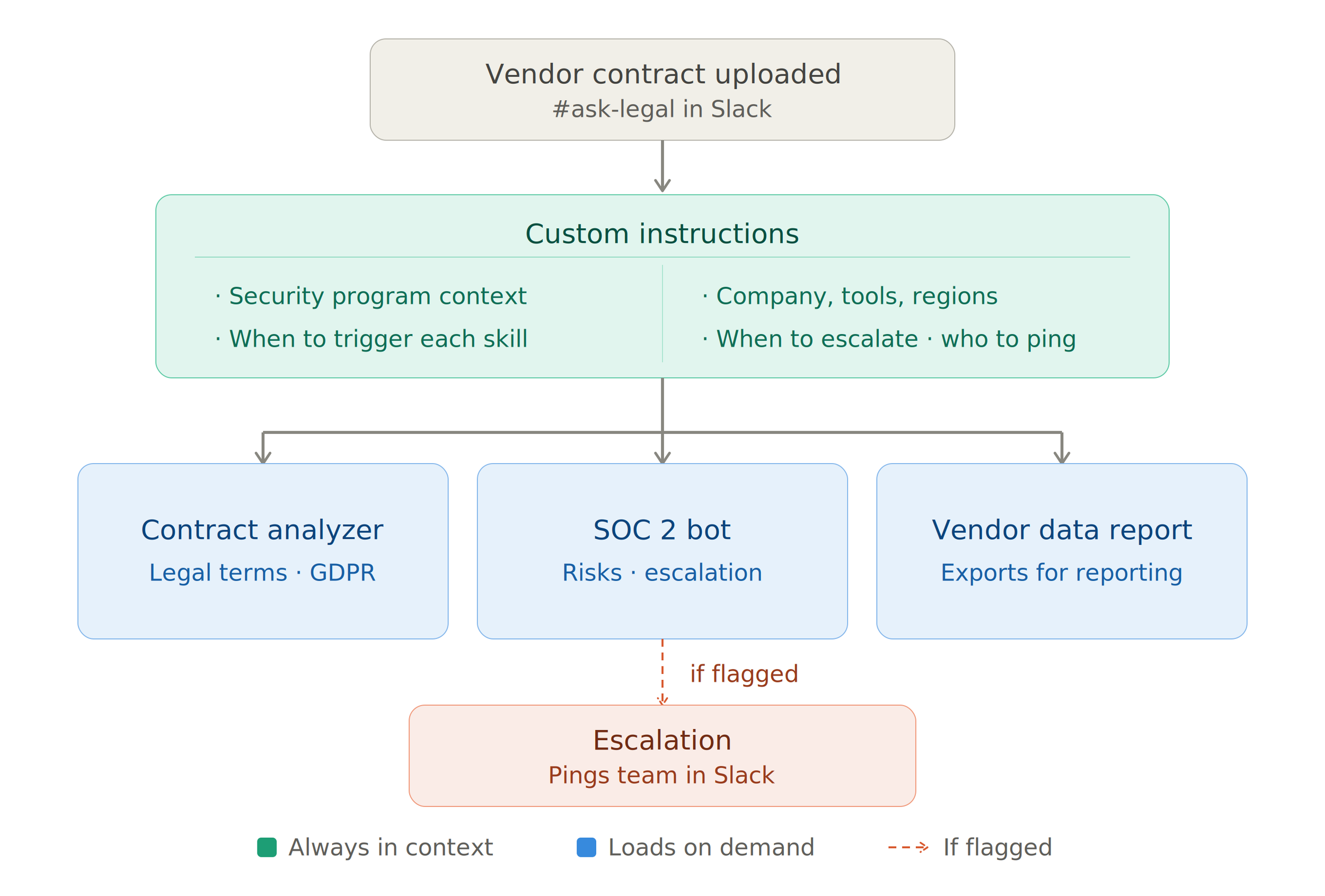
You can update individual skills without rewriting everything for a whole program. And when something breaks, you know exactly where to look.
One more thing worth noting if you're working across tools: this architecture is not Wordsmith-specific. Claude Projects works the same way. You set custom instructions at the project level - always in context - and skills load on demand. Same logic, different interface.
The practical takeaway
Skills, projects, Cowork, Code. These tools are moving fast, and if you're not keeping up with the most capable version of what exists, you're falling behind.
Because I’ve been using Claude, when Wordsmith released skills, I knew what to do but wanted to clarify with Wordsmith best practices for their platform.
If you've been learning how Claude handles skills and custom instructions inside a project or custom GPTs with ChatGPT, you already understand how a Wordsmith repository works. The logic transfers immediately. Not because someone designed it that way, but because this is becoming the standard pattern for how AI agents are structured.
A prompt is still what you type. A custom instruction is still persistent behavior. A skill is still a specialist you summon. Learn that and you can configure almost anything.
Are you prompting from scratch every time? Build a custom instruction
Is your custom instruction bloated and fragile? Start moving operational detail into skills
Are your skills doing things that should be orchestration logic? Move that back into the custom instruction
The three layers have different jobs. Keep them separate and your system stays manageable as it grows.
If you want to see exactly how I structured the Worksome Wordsmith repository, the custom instructions Wordsmith wrote, the skill, and how the Slack integration fits into all of it, that's in the Field Guide this week.
Speak soon!